
What We're Building: An AI Daily Business Assistant
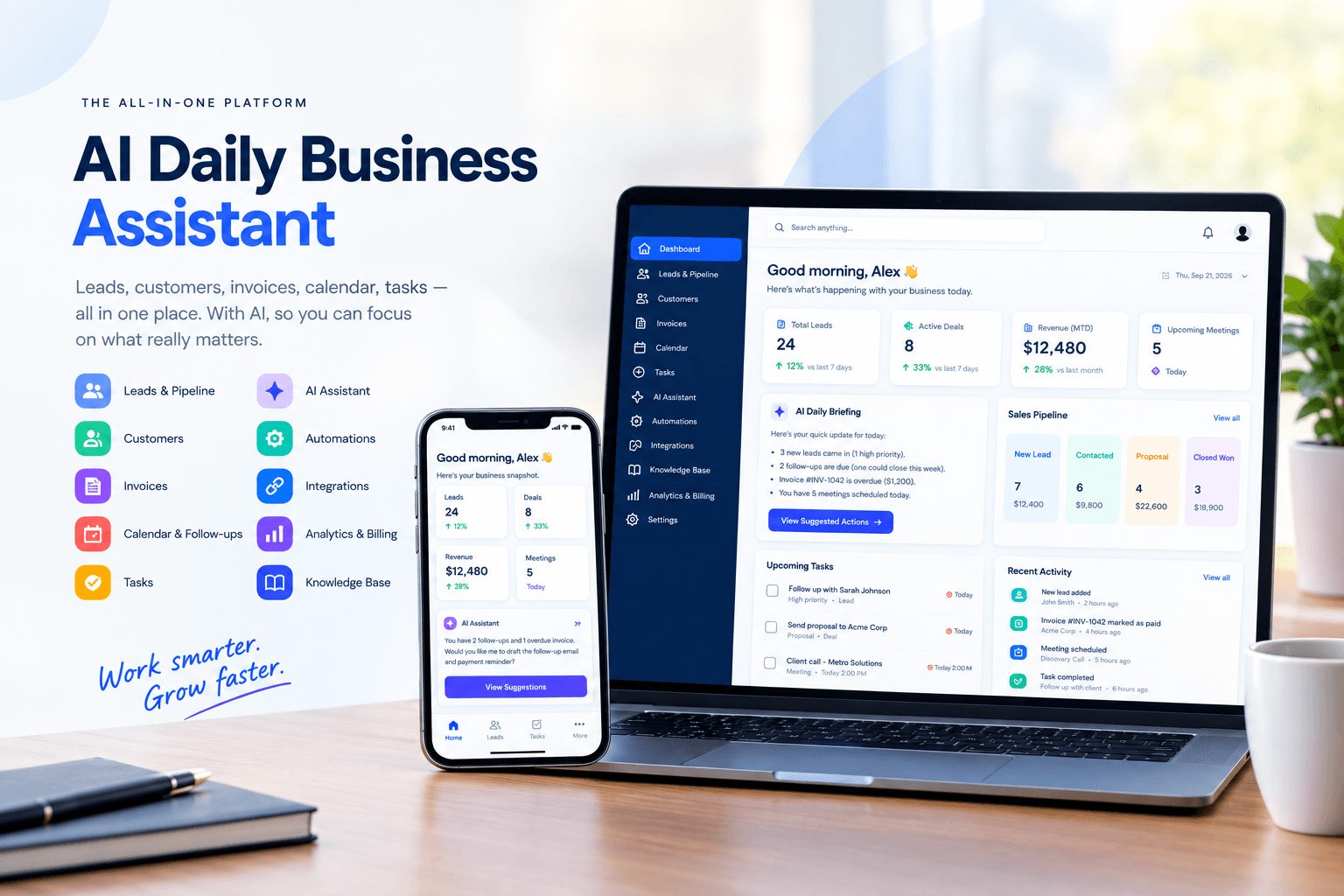
Small business owners run five tools to do one job: a spreadsheet for leads, a separate app for invoices, a calendar app for meetings, a notes app for follow-ups, and email for everything in between. Nothing talks to anything else, so the owner ends up being the one stitching it together every morning — and the thing that falls through the cracks is almost always the same: the follow-up that never got sent.
We started building the AI Daily Business Assistant to replace that stitching-together with one system, and hand the stitching itself to AI. This post walks through what it does, why it's built the way it is, and exactly where the build stands today — no rounding up.
Why This Approach
- One place, not five — leads, customers, invoices, pipeline, calendar, and tasks live in one app, so nothing needs re-typing between tools.
- AI drafts, human approves — the assistant proposes the next email, reminder, or note; the owner reviews and sends. It never acts silently.
- Built to plug into real tools — an integrations layer is designed in from day one, so it connects to the inbox and calendar you already use rather than replacing them.
What It Does — Module by Module
- Dashboard — a morning snapshot: an AI-written daily briefing, key numbers, and the top actions worth doing right now.
- Leads & Pipeline — track prospects from first contact to close, moved through deal stages on a visual board.
- Customers — a record for every client: history, contact details, activity, all in one profile.
- Invoices — create, send, and track payment status without a separate billing tool.
- Calendar & Follow-ups — meetings and the reminders tied to them, so no promised call-back gets forgotten.
- Tasks — the day's to-do list, linked back to the lead or customer it belongs to.
- AI Actions & Assistant — AI-suggested next steps (an email to send, a lead to chase) that the owner can accept, edit, or dismiss, plus a conversational assistant for direct questions.
- Automations — repeatable rules ("when a lead goes cold for 7 days, remind me") that run without manual triggering.
- Integrations — connections out to the email, calendar, and other tools the business already runs on.
- Knowledge Base — a place to store the business's own reference material so the AI can answer using real context, not guesses.
- Analytics & Billing — performance over time, and the account's own subscription/billing management.
Who It's For
The primary user is the owner-operator — a solo founder or small-team lead who is currently their own sales rep, bookkeeper, and scheduler, and needs the busywork automated, not another dashboard to babysit.
It also serves small internal teams — a handful of people sharing the same leads and customers, who need one source of truth instead of parallel spreadsheets.
Where the Build Stands Today
The full interface and workflow are built and running on realistic demo data, so every screen can be clicked through end to end:
- Full navigation across all eleven modules — dashboard, leads, pipeline, customers, invoices, calendar, tasks, AI actions, automations, integrations, knowledge base, analytics, billing, settings
- AI-style daily briefing and suggested-action cards on the dashboard
- Lead-to-deal pipeline with stage tracking
- Customer and invoice records with detail views
- Login flow and account settings
- Fully responsive — works on desktop and mobile
The next phase is connecting it to live data sources — a real inbox, a real calendar, a real AI model — in place of the demo layer. The architecture was built to make that a swap, not a rewrite.
Built With
Modern, actively-maintained tools chosen for speed and long-term maintainability — no exotic or unproven technology: Next.js, React, TypeScript, Tailwind CSS, Recharts, Zustand, and React Query.
Frequently Asked Questions
Is this available to use yet? Not yet — it's currently running on demo data while we connect it to live inbox, calendar, and AI integrations. Follow along for updates as it moves toward a real release.
Who is this built for? Solo founders and small teams who are currently juggling separate tools for leads, invoicing, and follow-ups, and want one system instead of five.
Why build a custom assistant instead of using existing CRM tools? Most CRM tools track data but don't act on it. The goal here is an assistant that drafts the next step for you — an email, a reminder, a follow-up — instead of just storing information you still have to act on manually.
Following the Build
If a tool like this would solve a real problem in how you run your business, or you want to see where this goes next, reach out — happy to talk through what's built so far.